Exciting news! CatalogX has just received a major upgrade, and it’s not just a simple update – it’s a complete transformation.
With CatalogX 6.0.0, we’re introducing a more intuitive interface, powerful new features, and an overall smoother experience. Whether you’re managing a product catalog, handling customer inquiries, or fine-tuning your store, this upgrade is designed to make everything easier and more efficient.
But before you rush to update, let’s go over what’s new and how to upgrade safely. Caution is key to ensuring a smooth transition!
What’s New in CatalogX 6.0.0?
We’ve completely revamped CatalogX to be more user-friendly, powerful, and flexible. Here are the top improvements:
A Modern, Intuitive Interface

- A sleek, updated design that makes catalog management easier than ever.
- A streamlined dashboard so you can accomplish more with fewer clicks.
Targeted Marketing for Better Engagement
- Enhanced tools to engage customers more effectively.
- New options to tailor your catalog marketing and inquiry processes to fit your business.
Module-Centric Features for Greater Flexibility
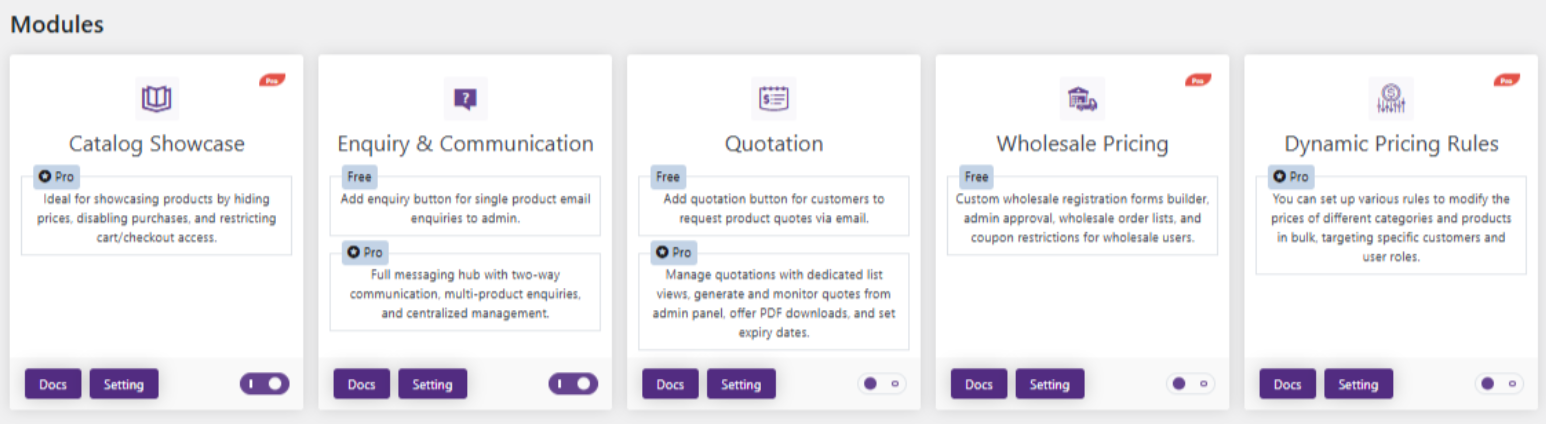
- Easily enable or disable features to customize CatalogX based on your needs.
- No more unnecessary clutter – activate only what matters to you.
Dynamic Displays for a Better Shopping Experience
- Customize product layouts for a more visually appealing catalog.
- Display products in ways that enhance customer interest and sales.
Seamless Integration with WooCommerce and Beyond
- CatalogX works flawlessly with WooCommerce and other platforms.
- Improved compatibility ensures a hassle-free experience.
How to Upgrade Safely – Step-by-Step Guide
Upgrading is exciting, but it’s crucial to do it the right way to avoid any disruptions to your live site. Here’s how:
Step 1: Set Up a Staging Site (Highly Recommended!)
Never update directly on your live site. A staging site lets you test changes safely. You can create a staging site using:
- Your hosting provider’s staging option.
- A plugin like WP Staging.
Step 2: Install the Upgrade
Once your staging site is ready:
- Update to CatalogX 6.0.0 on the staging site.
- Let the system migrate your settings automatically.
Step 3: Test Everything
Before upgrading your live site, carefully check:
- Catalog functions – Ensure products are displayed correctly.
- Customer inquiries – Test how inquiries are processed.
- Product layouts – Make sure they look the way you want.
- Customizations – Verify that any custom settings still work properly.
Step 4: Upgrade the Live Site
Once you’ve tested everything and are confident it works well, apply the update to your live site.
Why This Upgrade is a Game-Changer
Enhanced User Experience
- A more intuitive, lightning-fast workspace.
- Less time spent managing catalogs, more time growing your business.
Powerful Customization
- Fine-tune CatalogX to match your business needs.
- Greater control over product presentation and inquiries.
Built for All Business Sizes
- Whether you’re a solo entrepreneur or part of an enterprise team, CatalogX scales with you.
Upgrade, Explore, and Earn – Your Thoughts on CatalogX 6.0.0 Matter!
To celebrate this major release, we’re offering exclusive rewards for users who provide valuable insights:
🎉 100% Discount Coupon – Awarded to the user with the most helpful feedback on features and performance.
🎉 50% Discount Coupon – Given to users who share at least three key insights or suggestions.
📢 Who’s Eligible?
- Users with at least six months left on their Catalog Enquiry Pro subscription.
⏳ Hurry! This is a limited-time offer. Submit your feedback through the provided link to claim your reward!
Take the Next Step!
CatalogX 6.0.0 is a huge leap forward, offering better usability, flexibility, and performance. By following our upgrade guide, you can ensure a smooth transition and make the most of these powerful new features.
Ready to upgrade? Take the next step and unlock the full potential of CatalogX today! 🚀