
Exclusion Hub: Tailored Visibility & Interaction Control
WooCommerce Role-Based Access: Hide Products & Control Features by User Role
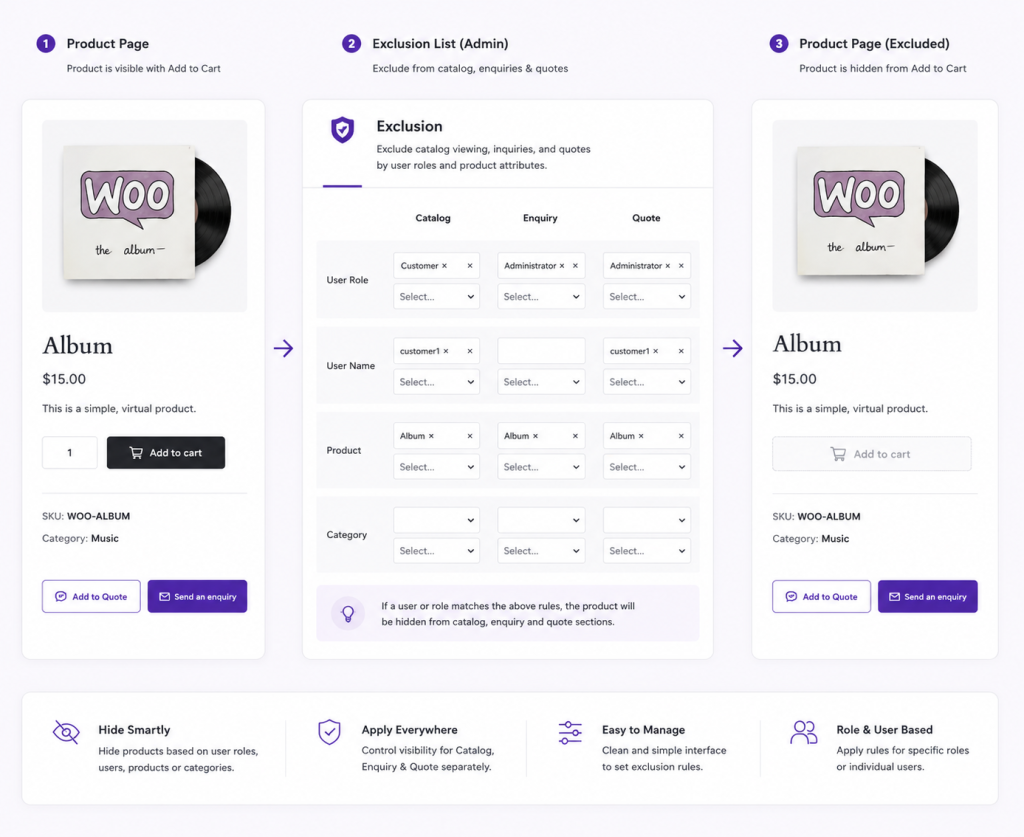
Smart Access & Interaction Manager
Optimize your sales funnel with targeted visibility and engagement controls
Role-Based Access
Control catalog visibility based on user roles. Show different products to wholesale vs retail customers. Hide sensitive features from guests.
Product-Specific Access
Hide specific products from certain customer roles or user groups. Show wholesale-only products to approved wholesale buyers.
Customer-Centric Experiences
Toggle product, quotation, and inquiry features on/off by user role. Show complete features to wholesale buyers, limited features to retail.
Dynamic Catalog Visibility
Replace standard shopping buttons with personalized inquiry forms. Connect with potential customers and gather valuable information effortlessly.

Transform your WooCommerce store from ordinary to extraordinary – CatalogX is your key to unlocking unparalleled growth, efficiency, and customer satisfaction.
What is CatalogX Exclusion Hub and what does it do?
Exclusion Hub is a WooCommerce role-based access control tool. It lets you hide/show
products, pricing, quotes, and inquiries based on customer user role (wholesale, retail,
guest, etc.). Control who sees what in your store.
How do user roles work in Exclusion Hub?
Create user roles (Wholesale, Retail, VIP, Guest). Assign products, prices, and features
to each role. Customers in “Wholesale” role see wholesale products and pricing. “Retail”
role sees retail products. Guests see limited/nothing.
Can I hide products from certain customer types?
Yes. Mark products as “Wholesale Only” (only visible to wholesale users) or “Retail Only”
(only visible to retail users). Guests see nothing or public catalog.
Can I show different prices to different user roles?
Yes. Combined with Dynamic Role-Based Pricing feature. Wholesale role sees wholesale
pricing. Retail role sees retail pricing. Full flexibility.
How is this different from WordPress user roles?
WordPress roles control ADMIN access (who can edit). Exclusion Hub controls CUSTOMER
access (who can SEE what products/prices/features). Different purpose, complementary tools.
Can I hide the “Quote” button from retail customers?
Yes. Show “Add to Quote” button only to wholesale role. Retail customers see “Add to Cart”
instead. Hide features per role.
Do I need Exclusion Hub if I just have retail customers?
No. If all your customers are the same type (all retail), you probably don’t need role-based
access. It’s most valuable for B2B/multi-channel stores (wholesale + retail).
What happens if a guest doesn’t have access to a product?
The product is hidden from them completely. They can’t see it, search for it, or click it.
Only the roles you specify can see the product.