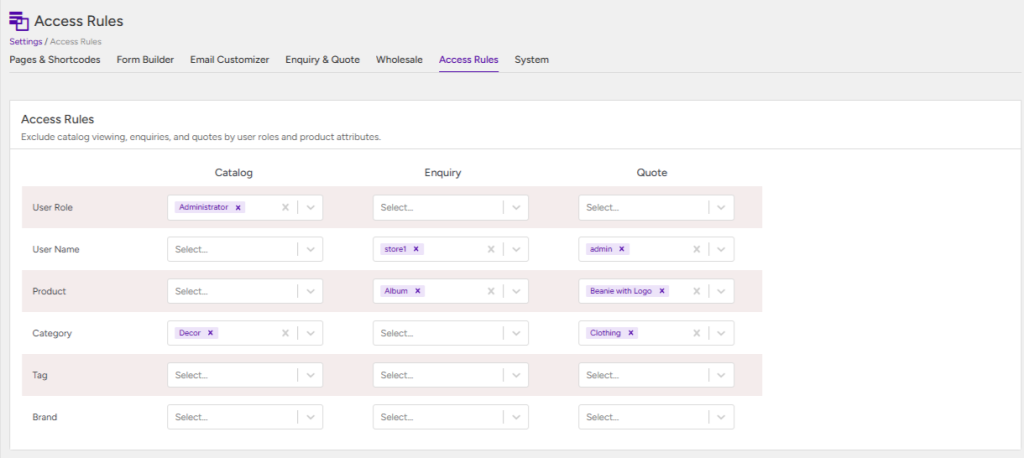
Brief Description #
The Access Rules section allows you to control where your catalog features are available across your WooCommerce store. Using flexible exclusion rules, you can enable or restrict the Catalog, Enquiry, and Quotation features based on different conditions, such as products, categories, tags, user roles, or other supported parameters. This gives you complete control over which customers can access specific features and helps you create a more personalized shopping experience.
Configuration of the settings for the Access Rules #
Let us now discuss about the different parameters for which exclusion can be added –
User Role #
In this section, administrators can customize the application of catalog mode and related features based on user roles:
- Catalog Mode Exclusions: Select specific user roles that will be exempt from catalog mode restrictions. These users will experience normal shopping functionality.
- EInquiry Button Exclusions: Choose user roles for whom the Enquiry button will not be displayed on the frontend.
- Request Quote Button Exclusions: Specify user roles that will not see the Request Quote button on the frontend.
User Name #
In this section, administrators can customize the application of catalog mode and related features based on user name:
- Mode Exclusions: Select specific user names that will be exempt from catalog mode restrictions. These users will experience normal shopping functionality.
- Enquiry Button Exclusions: Choose usernames for whom the Enquiry button will not be displayed on the frontend.
- Request Quote Button Exclusions: Specify usernames that will not see the Request Quote button on the frontend.
Product #
In this section, administrators can customize the application of catalog mode and related features based on Product name:
- Enquiry Button Exclusions: Choose products for which the Enquiry button will not be displayed on the frontend.
- Request Quote Button Exclusions: Specify products that will not have the Request Quote button on the frontend.
- Catalog Mode Exclusions: Select specific products that will be exempt from catalog mode restrictions.
Category #
In this section, administrators can customize the application of catalog mode and related features based on categories :
- Catalog Mode Exclusions: Select specific categories that will be exempt from catalog mode restrictions.
- Enquiry Button Exclusions: Choose products for which the Enquiry button will not be displayed on the frontend.
- Request Quote Button Exclusions: Specify categories that will not have the Request Quote button on the frontend.
Tag #
In this section, administrators can customize the application of catalog mode and related features based on product tags:
- Catalog Mode Exclusions: Select specific tags that will be exempt from catalog mode restrictions.
- Enquiry Button Exclusions: Choose tags for which the Enquiry button will not be displayed on the frontend.
- Request Quote Button Exclusions: Specify tags that will not have the Request Quote button on the frontend.
Brand #
Use this setting to exclude specific brands from the Catalog, Enquiry, and Quotation features. Products belonging to the selected brands will not follow the corresponding CatalogX rules.
- Catalog Mode Exclusions: Select the brands that should remain unaffected by Catalog Mode. Products from these brands will continue to display their regular purchasing options.
- Enquiry Button Exclusions: Select the brands for which the Enquiry button should not appear on the product pages.
- Request Quote Button Exclusions: Select the brands for which the Request Quote button should not be displayed on the product pages.