Brief Description #
It helps to transform your WooCommerce site into a comprehensive product catalog. This module allows you to showcase your products without the option for customers to make purchases directly on the site. It is perfect for businesses that want to display their product range, provide detailed product information, and generate enquiries from potential customers. With the Catalog module, you can easily manage and present your products in a visually appealing and organized manner, making it an essential tool for any WooCommerce store looking to operate as a catalog.
Requirements #
Configuration of the Catalog Showcase module #
So to start with the module the admin needs to follow the following steps-
- Go to the admin dashboard and from the navigation menu click on the CatalogX option
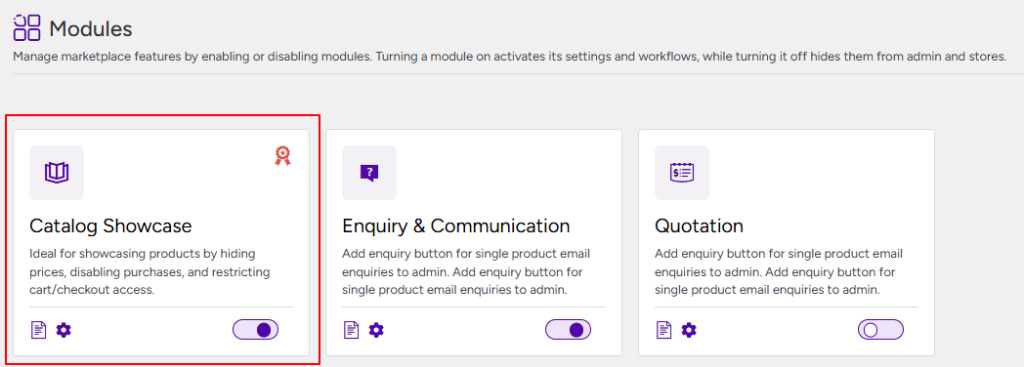
- After this, from the submenu list click on the “Modules” submenu and here the Catalog Showcase module will be enabled by default.
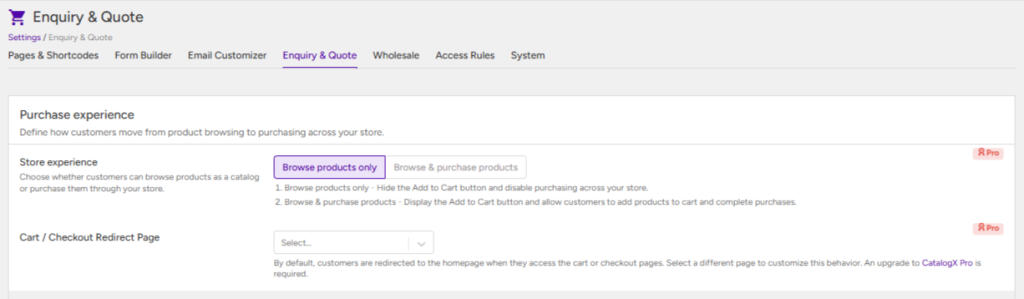
To configure the Catalog Showcase module, navigate to Settings → Enquiry & Quote. Under the Purchase Experience section, you’ll find the following settings that control how customers interact with your store.
This setting determines whether customers can only browse your products as a catalog or make purchases through your store.
- Browse Products Only (Default): Displays your products in catalog mode by hiding the purchasing options, allowing customers to browse without placing orders.
- Browse & Purchase Products: Enables customers to browse and purchase products as they normally would in a WooCommerce store. This option is available only when CatalogX Pro is installed and activated.
Cart/Checkout Redirect Page #
When Browse Products Only mode is enabled, the cart and checkout pages are no longer accessible since purchasing is disabled. By default, customers attempting to access these pages are redirected to the homepage.
Using this setting, you can choose a custom page to redirect customers to instead, providing a more relevant destination and a better user experience.